Guide · Slide deck
Slide deck — a whole deck in any look
For anyone who needs a presentation and has the content (or just the topic) but not the design.
The film was shot on an earlier frame of the app; the five steps below are the screens as they are today.
Step by step
- 1
Step 1 · Content
Slide deck opens from PowerPoint (“Draw it new”), from a look’s “Build a deck in this look”, or by its address, /deck. Drop a PowerPoint (.pptx), PDF or Word (.docx) file, paste the text, add a website, or just type what the deck is about — and say who it is for. Press Continue.
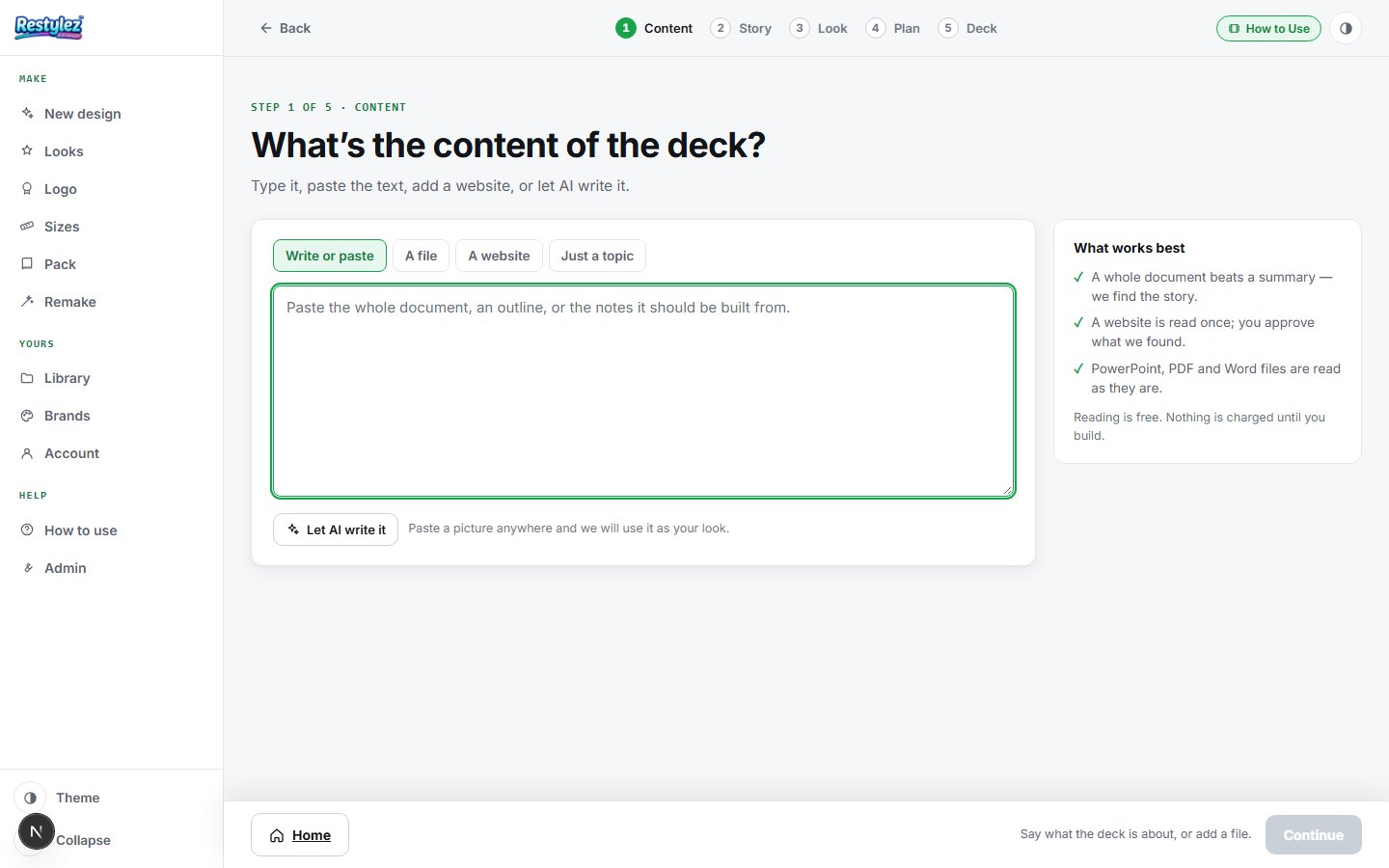
The whole screen · click to open full size - 2
Step 2 · Story
We read your material and say what we found: the one sentence every slide will argue, and the angle. Approve it with “That’s right — build the plan”, or change the story and we read your material again for it. Nothing is charged here.
- 3
Step 3 · Look
Pick a look — every slide wears its colors, type and mood, never its words — or drop in a design of your own (tick that it is yours). Optionally pick a saved brand so your real logo is placed on every slide, and give “Art direction” for anything you want different across the slides: no people, more white space, darker, bigger headlines. Press “Continue to the plan”.
- 4
Step 4 · Plan
One card per slide, with the kind of slide it should be (bullets, chart, big number and so on). Change any title or point, pick a different kind, move slides up or down, delete them, or add one. The words here are the words on the slides. The button shows the slide count and the price — press “Build the deck”.
- 5
Step 5 · Deck
A deck takes about 10–15 minutes; the screen shows each slide as it lands. Each finished slide has Fix (say what to change on just that slide), Retry and a download button. “Download PowerPoint” saves the whole deck as a .pptx that opens in PowerPoint, Keynote and Google Slides; the PDF button beside it saves a PDF instead. Both also save to your My designs. One thing worth knowing: each slide is a designed picture, so the deck presents anywhere but its words cannot be retyped in PowerPoint afterwards — make changes here with Fix, where a redraw costs a few cents.
If something goes wrong
The messages the page can show, and what to do.
- “This needs a little more before we can build.”
- The description is too thin to design from — a few words about what it is and what it needs to get across is enough. We suggest a stronger wording you can use as-is.
- “That does not look like a public web address.”
- Only public websites can be read. A local address, an internal company address or a file path is refused on purpose.
- “That page had almost no readable text on it.”
- The page is probably built entirely from pictures. Try another page on the same site — an About or Services page usually has the most words.
- “We reached that page but could not find enough about the business on it.”
- The page was mostly navigation or a holding page. Try the home page, or an About or Services page.
- “Say what the deck is about, or add a file.”
- Both the file box and the topic box are empty. Give it one of them.
- “That PDF had no text in it, so we read all N pages off the pictures.”
- Not an error — a note. Your PDF was pictures of pages (a deck exported as images, or a scan), so we read the words off each page before planning the slides. Give the plan a glance to check it read your figures right.
- “That PDF is N pages of pictures with no text in it. We can read up to 40 pages that way…”
- The file is too long to read page by page. Split it, upload the PowerPoint or Word file it came from, or type what the deck is about.
- “Could not build a slide plan from that.”
- The file had too little readable text. Type the topic instead, or paste the text into a Word file.
- “Pick a look, or drop in a design of your own.”
- Step 3 has no look yet. Click one, or drop a JPG, PNG or screenshot of a design whose look to copy.
- “Slide N didn’t build.”
- One slide failed while the rest came through. Press Retry on that slide — when the failure was ours the button says “Retry — free”.
- “The deck failed to build.”
- The whole run failed and nothing was charged. Press “Build the deck” again.
- “Your payment went through. The credit is taking a moment to arrive — press “Build the deck” in a few seconds.”
- Not an error. The credits you just bought are landing; wait a few seconds and press the button once more.
- “That fix failed — say it differently.”
- Name the change: “make the title bigger”, “change the third bullet to…”.
- “Could not reach the maker — try again.”
- Your connection dropped for a moment. Check you’re online and press the button again. A job that fails is never charged.
- “You’re out of credits. Add some to keep going.”
- Your balance can’t cover this piece. Add credits on the Account page — your work carries on from where you left off. Nothing was charged.
Other guides